




Meshy’s 3D Agent Turns Photos and Prompts into Print-Ready 3D Models
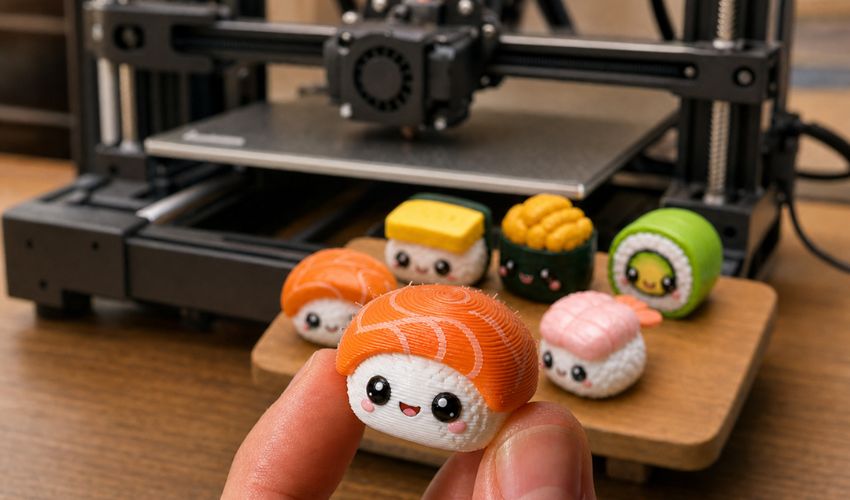
Every 3D printed object starts as an idea. But before that idea can become a physical part, figurine, or prototype, it first needs to become a digital 3D model. For many makers, that’s often the hardest part of the process.
Over the past few years, desktop 3D printing has become easier in almost every other respect. Machines are cheaper, calibration is increasingly automated, and slicers now provide tested profiles for common materials and printers. Yet creating a custom object still often requires CAD knowledge, a suitable STL file, or help from a professional designer.
The bottleneck in desktop 3D printing is therefore shifting. It is no longer the printer or the print settings. Increasingly, it’s finding the right model in the first place.
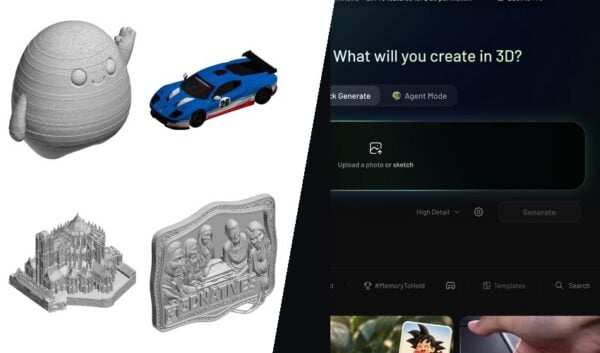
The Meshy 3D Agent enters at that point. Its main proposition is not simply that AI can generate a mesh from a prompt, photo, or sketch: several tools can already do that. The more relevant question for 3D printing is what happens after the first mesh appears.
Meshy attempts to keep that next stage inside the same conversation. Users can explore several directions, refine an existing result, ask printing-related questions, check the geometry, and export the model as a watertight STL or 3MF file without restarting the process each time.
How the 3D Agent works
The process begins with a text prompt, photo, or sketch. From there, the 3D Agent proposes different directions and generates multiple model variations, which users refine as the conversation goes on. It also retains the context of previous exchanges, so each iteration builds on the last. The Agent can even answer 3D printing questions in the same conversation, such as model orientation or print settings, so users don’t have to break off and look the answer up elsewhere.
This matters because a 3D design rarely emerges correctly from a single prompt. The useful part is being able to keep correcting it without knowing how to model.
From generated mesh to printable model
Generating a textured 3D model takes around one minute. But speed alone does not determine whether the result is useful for 3D printing. The more important question is whether the model can pass through the rest of the workflow without extensive manual repair.
Many AI-powered 3D modeling tools stop once a mesh has been generated, leaving users to repair the file before it can be printed. While a model may appear complete on screen, issues such as holes, non-manifold geometry, or inverted faces can cause it to fail during slicing.
The Meshy 3D Agent checks the model before export and produces watertight files for printing. In the company’s internal testing, around 97% of figurine-type models passed validation in Bambu Studio. As an internal benchmark, that figure is not a guarantee for every model, but it indicates the type of problem the Agent is intended to solve: reducing the gap between a generated mesh and a file that a slicer can actually process.
For 3D printing, finished models can be exported as STL or 3MF files. Meshy also supports FBX, OBJ, GLB, USDZ, and BLEND for users who want to continue editing or use the asset in other 3D workflows. GLB is the default output format.
The platform can send models to Bambu Studio, OrcaSlicer, Creality Print, Cura, Elegoo Slicer, and Lychee. It also supports workflows involving Bambu MakerWorld, multi-color 3MF and AMS files, and Formlabs’ Form Now.
Taken together, these features position the 3D Agent less as a standalone generator and more as a bridge between AI-generated geometry and the tools used to prepare, edit, and print it.
For now, generative 3D is strongest on organic and character shapes. Parts that need tight tolerances are still better handled in parametric CAD. Features under 1 mm can be fragile, and generated dimensions are not exact, so anything that has to match a real measurement should be scaled in the slicer.
When one printable model isn’t enough: Auto Spilt
The 3D Agent is designed to get you to a single printable model. But some objects are too large for the print bed, or too complex to come off the printer in one piece. For those, Meshy has a separate tool called Auto Split that takes a finished model and separates it into multiple parts that fit together.
What sets Auto Split apart from a simple geometric cut is that the parts are designed to be reassembled. Rather than slicing a mesh into arbitrary chunks, it generates separate, printable pieces with connecting surfaces so they can be joined back into the complete model after printing. Each part exports as its own watertight file, ready to slice individually.
In practice, Auto Split lets you print oversized objects in sections, break a complex shape into pieces that need less support, or separate a model into distinct parts for multi-color and multi-material printing. It is part of translating a visually complete model into an object that respects the physical constraints of a printer.
Who’s it for?
The Agent is aimed at makers and hobbyists, along with designers, educators, and small product teams who want custom prints without modeling skills. In practice that means printable 3D models like tabletop miniatures, cosplay props, and replacement parts, or a child’s drawing turned into a printed toy.
A shorter route to the first usable model
Although experienced designers will still rely on traditional CAD for projects that demand precise dimensions, conversational AI tools are beginning to lower the barrier to entry for everything else. For makers who want custom figurines, props, or prototypes, Meshy’s 3D Agent offers a way to turn an idea into a printable model without learning CAD first.
With more than 12 million registered users and a 4.8/5 rating on G2 and Trustpilot, Meshy is one of the most widely used AI 3D modeling platforms available.
Would you try Meshy’s 3D Agent? Let us know in a comment below or on our LinkedIn and Facebook pages! Don’t forget to sign up for our free weekly Newsletter here, the latest 3D printing news straight to your inbox! You can also find all our videos on our YouTube channel.



please do less generative AI 3d modelling posts, this stuff is rubbish and they pose a real risk to engineers and real world products. Along with not producing good results often being overly complex models even when asking them to do a cube and getting 200k faces. If you are going to look into that side of engineering look at generative design/ topology which are routed in simulations and real world applications like aerospace and let the proper engineers and design do the 3d models.