

The Top AI 3D Model Generators for 3D Printing
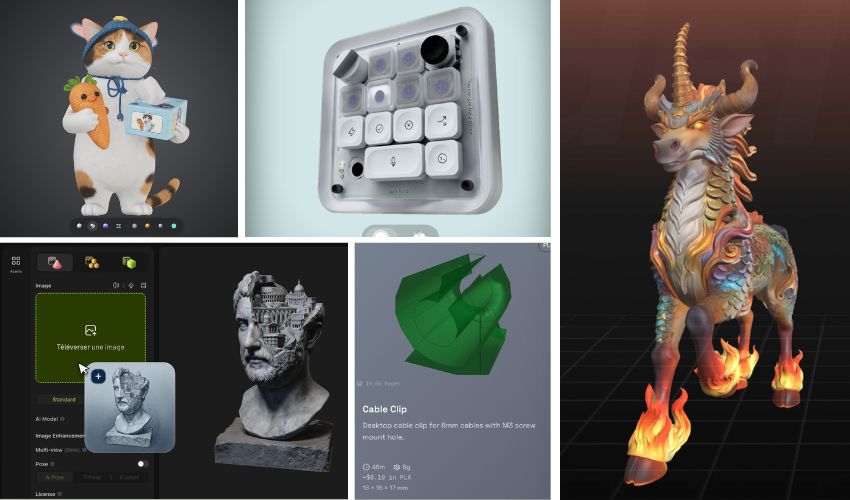
One of the most intimidating aspects of 3D printing can be the software element. If you can’t find a pre-designed 3D model that suits your needs, you might have to create your own, and making your own 3D design is no easy feat. With artificial intelligence usage skyrocketing, there are dozens of 3D AI model generators surfacing online.
However, many of these tools were originally designed for video games and animation, digital environments where geometry doesn’t need to comply with the physical world. While many platforms have since adapted for 3D printing, the connection is becoming even more explicit. Platforms like Bambu Lab’s MakerLab now directly integrate engines like Meshy, Tripo, Rodin, and Hunyuan 3D into their workflows, making automated 3D generation more accessible to makers than ever.
Here, we’re exploring 6 of the most popular 3D model generators, listing their pricing, model quality and print-readiness, texture and material quality, editing and customization tools, generation speed, commercial licensing, and platform integrations. Note that generation speed and quality claims (polycount, mesh cleanliness, texture resolution) are drawn from each platform’s own published figures and marketing materials rather than independent testing, so treat them as a starting point for comparison rather than a guarantee of real-world results. The platforms are listed in alphabetical order. If you’re interested in a general guide to using these model generators, see our walkthrough here.
Fast3D
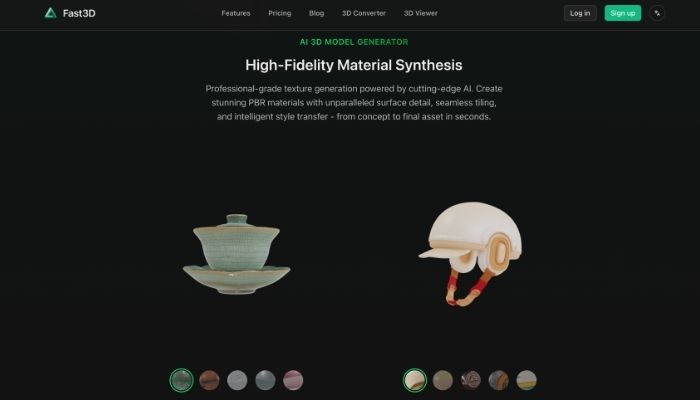
Fast3D (fast3d.io) is an AI-powered 3D model generator that converts text descriptions or images into textured meshes in a matter of seconds. It is a web application designed for creators, designers, and developers, with a focus on video games, AR/VR, product design, and 3D printing.
Pricing and plans:
Fast3D operates on a credit-based subscription model with four tiers.
The Free plan ($0) offers 300 credits per month, one concurrent task, two downloads per day, limited queue priority, and outputs licensed under CC BY 4.0. The Pro plan costs $10/month ($7/month with annual billing) and includes 10,000 credits, two concurrent tasks, unlimited downloads, PBR textures, multi-view-to-3D rendering, and private user-owned assets.
The Max plan costs $20/month ($14/month when billed annually) and includes 30,000 credits, four concurrent tasks, maximum queue priority, and access to Pro and Ultra quality levels.
Finally, the Max Unlimited plan removes all limits on credits, tasks, and downloads. To find out the price, contact the company.
Model and Mesh Quality / Print-Ready:
Four mesh quality levels (Fast, Standard, Pro, Ultra) that trade speed for geometric detail; Free users are limited to Fast and Standard, while Pro and Ultra are unlocked on paid plans. Export formats include GLB/GLTF, FBX, OBJ/MTL, and STL, so files are compatible with video game engines, 3D creation software, and 3D printing slicers; however, as with most mesh generators, the output consists of geometry for visualization and assets, not parametric CAD.
Texture and Material Quality:
Fast3D generates PBR (Physically-Based Rendering) material sets with an emphasis on surface detail, seamless tessellation, and style transfer.
Editing and Customization Tools:
Flexibility starts at the input stage: text-to-3D, single-image-to-3D, and multi-view (multiple images)-to-3D, with selectable styles. It does not include a mesh editor, retopology, or rigging tools within the app; customization is done through prompts, images, and quality settings, and editing is expected to take place later in other 3D software.
Generation Speed:
It is stated that model generation takes between 5 and 180 seconds depending on the settings (from 5 to 30 seconds for simple, textureless meshes, up to about 3 minutes for high-polygon models with PBR). Generation runs in the background, so you can leave the page and check the result later in the assets section.
Commercial License:
Outputs from the free plan are licensed under CC BY 4.0, meaning they can be used commercially but require attribution. Paid plans make the assets private and the property of the user, with commercial use permitted under the terms of service.
Integrations:
For now, only a web app is available. There is no public API yet; it’s on the roadmap with an early access waitlist, so there are currently no plugins or scripting pipelines.
Hi3D
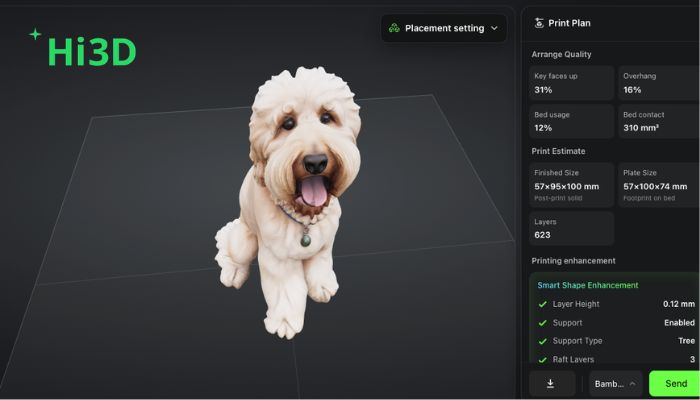
Hi3D is an AI 3D maker platform from Math Magic, previously known as Hitem3D. It launched in July 2025, runs on the company’s in-house Sparc3D and Ultra3D models, and is based in Hong Kong. The focus is narrower than most tools here: Hi3D is built for 3D printing rather than general asset creation.
Credit: Hi3D
Pricing and plans:
Hi3D runs on credits across four tiers. The free tier gives 100 trial credits for the lifetime of the account rather than per month, which covers roughly seven to 10 models. You get one generation at a time, trial access to most features, and no option to buy top-ups. Pro is $19.90/month for 1,000 credits and up to 100 models, with 10 concurrent tasks. Max is $39.90/month for 2,400 credits and 240 models with 20 tasks. Ultra is $129.90/month for 8,000 credits and 800 models with 30 tasks and unlimited storage. Annual billing was discounted 30% at the time of writing, which brings Pro to $13.93/month. Free retries scale from three per task on Free to 15 on Ultra, and failed generations are refunded. Subscription credits expire monthly. Purchased credit packs, from 1,000 credits at $20 to 20,000 at $400, never expire, but you need an active subscription to buy or spend them.
Model/mesh quality and print-readiness:
Hi3D generates at 1536³ resolution. V3.0, announced for release on August 19, 2026, raises this to 2048³. Exports cover OBJ, GLB, STL, FBX and USDZ, with 3MF from the multicolor mode. The company says meshes come out watertight, with structural integrity and printability handled automatically. Segmentation splits large models into printable parts and adds mortise-and-tenon or ball-joint connectors, and a Press-Fit Tolerance system works out assembly clearances from your printer, nozzle size and material.
Texture and material quality:
PBR is a toggle, billed on top of the base texture. You can stop at an untextured mesh, which is often what you want for printing, or add texture with or without PBR maps. V3.0 raises maximum texture output to 8K. The Stylized Texture tool applies textures from reference images to models made elsewhere, taking GLB, STL and OBJ up to 500MB, and a shading intensity slider controls how much lighting from the source image gets baked in. There is also a vertex color mode.
Editing and customization tools:
The workspace covers text to image, 3D generation, stylized texture, split to print, multi-color print and 3D relief. Concept images can be generated or edited before reconstruction, using four third-party image models: Nano-Banana-Pro, Nano-Banana 2, Seedream V4.5 and GPT Image 2. Smart build plate optimization sets orientation and support strategy by model type, favoring surface quality on figures and less support material on mechanical parts.
Generation speed:
Geometry alone takes about two minutes. Add texture and it rises to around five. Speed also scales by tier across four channels, from a standard channel on the free plan through fast on Pro and high-speed on Max to ultra-fast on Ultra.
Commercial licensing:
Every generation is set to either CC BY 4.0 or Private, and Private is a paid feature, so free users have to publish their models publicly. Paid plans give private ownership and commercial use. Note that Hi3D’s terms of use ask anyone sharing or selling generated content to credit “Created with Hitem3D.”
Platform integrations:
Hi3D publishes an open API, billed separately from web subscriptions at $0.02 per credit, and offers an official Blender plugin. Its enhanced 3MF export maps model colors to official Bambu Lab filament profiles and embeds print settings like temperatures, layer heights and supports, so files can go straight to Bambu Studio, OrcaSlicer, Creality Print or Elegoo Slicer. Hi3D also lists partnerships with Creality, xTool and MakerWorld in the Bambu Lab ecosystem.
Meshy
Meshy is an AI 3D model generator founded in 2023 by Dr. Yuanming (Ethan) Hu. It turns text prompts, photos and sketches into 3D models without any modeling experience, and runs as a web app with a developer API, plugins for major 3D software and a community model library. In July 2026 the company raised nearly $400 million at a $1.5 billion valuation and reported more than 12 million registered users. The current model is Meshy 7, built around image alignment so the result stays closer to the reference.
Pricing and plans:
Meshy runs on credits, which are consumed each time you generate a model or apply a texture. There are two categories of plan. The Individual lineup has four tiers: Free ($0) gives 100 credits and one queued task; Pro ($20/month) gives 1,000 credits and 10 queued tasks; Premium ($40/month) gives 3,000 credits and 30 queued tasks; Ultra ($100/month) gives 8,000 credits and 100 queued tasks. The three paid tiers also unlock higher queue priority, unlimited downloads, multi-view image-to-3D, community model downloads and free retries, which range from 4 on Pro to 40 on Ultra. The Team category has two tiers: Studio at $70 per seat per month, with credit pools that scale from 5,500 credits at $70 to 28,000 at $350, and an Enterprise plan at custom pricing that adds SSO, dedicated support and higher API throughput. Plan credits reset monthly and do not roll over, but permanent credits bought separately never expire.
Model and mesh quality / print-readiness:
Meshy exports STL and 3MF for printing, plus FBX, OBJ, GLB, USDZ and BLEND. Files go straight to a slicer with no conversion step. A printability check runs before export and flags thin walls, floaters, holes and non-manifold edges. Auto Repair then fixes broken meshes and inverted normals. Smart Topology gives control over polygon count, from 100 up to 15,000. In Meshy’s own testing, around 97% of figurine-type models passed validation in Bambu Studio. Dimensions are not exact, though, and features under 1 mm can be fragile. Scale anything that has to match a real measurement in the slicer.
Texture and material quality:
Meshy generates PBR-ready texture sets at 2K or 4K for 10 credits, or 8K for 15. A multi-color tool applies vertex colors for Bambu AMS, Creality CFS and OrcaSlicer.
Editing and customization tools:
The 3D Agent refines models through conversation. It generates variations and keeps the context of earlier exchanges, so each round builds on the last. Auto Split breaks a model into printable parts, repairs the cut surfaces and arranges them on the print bed, and it hides the seams along concealed boundaries. Auto-rigging costs no credits.
Generation speed:
A textured 3D model takes around one minute to generate, while Smart Topology produces untextured geometry in about 10 seconds. Paid tiers get higher queue priority and more concurrent tasks: Free allows one task at low priority, Ultra and Enterprise allow 100 at the highest.
Commercial licensing:
Free plan models carry a CC BY 4.0 license. You can use them commercially, but you have to credit Meshy. Paid plans give full private ownership with no attribution, as long as you do not publish the models to the Meshy Community and the source materials do not infringe anyone else’s copyright.
Platform integrations:
Models export in one click to eight slicers, including Bambu Studio, OrcaSlicer, Creality Print and Ultimaker Cura, with no plugin needed. Plugins cover Blender, Maya, 3ds Max and ZBrush, plus game engines such as Unity and Unreal, and a developer API handles scripted pipelines. The plugins are free to download, but sending models straight into those tools needs a Pro account or above.
Neural4D
Neural4D (N4D) is an AI-powered 3D model generator launched in 2024 by DreamTech, a company specializing in AI for 3D. It is a web-based platform (with an API for developers) that converts text, images, or sketches into editable 3D models. It is aimed at independent creators, video game studios, product design firms, animation studios, XR companies, and researchers.
Pricing and plans:
Neural4D operates on a credit and subscription system. The Free plan offers 50 credits per week and one concurrent task. The Pro plan is billed in three ways: weekly, at $19.90/week with 1,500 credits per week; monthly, at $48/month with 7,500 credits per month; and annually, at $358.80/year (about $6.90/week) with 7,500 credits per month. All payment plans allow for up to 20 concurrent tasks. Each text-to-3D or image-to-3D generation costs 10 credits (without texture), and subscribers can purchase additional credit packs.
Model and mesh quality / print-ready:
Neural’s engine reconstructs the entire object (not just the visible part) by analyzing its volume, resulting in a closed model with no holes or geometric errors, ready to print without requiring any prior repairs. Export to OBJ, FBX, GLB, USDZ, STL, and BLEND; note that free users can only download the untextured mesh, while downloading the complete model with textures is reserved for paid plans.
Texture and Material Quality:
Generates native PBR materials (Normal, Roughness, and Metallic maps) through a process decoupled from the geometry, producing clean textures ready for engines and tools such as Substance Painter. Texture synthesis can be enabled or disabled for each generation.
Editing and customization tools:
Supports multimodal input (text, single image, multiple views ranging from 3 to 6 photos, and sketches) and offers Neural4D-2o, a conversational model that allows you to refine materials, scale, and geometric details using natural language; Since the meshes are clean and feature standard UVs, they can be edited seamlessly in Blender or other digital content creation (DCC) tools. The platform itself also advertises retopology/refinement and rigging with animation, although at the time of writing, its FAQ lists these as “coming soon” features, so their availability may be limited.
Generation speed:
Neural4D’s engine generates the “watertight” base mesh in about 90 seconds, and generating full PBR textures and assembling the final, production-ready model adds approximately 2 more minutes.
Commercial License:
Paid subscribers may use the generated models for commercial purposes, and DreamTech states that it does not claim intellectual property rights over the generated content. Free users are limited to the untextured mesh for personal, non-commercial use, and models marked as “Trial” are for testing purposes only. The platform also states that the generated assets are not used to train its models nor shared without permission.
Integrations:
It is a browser-based tool that requires no installation, with preview and download capabilities available on mobile devices as well, and models compatible with Unity, Unreal Engine, Blender, WebGL, and Omniverse. It offers an API for developers (text-to-3D and image-to-3D), and DreamTech also publishes its research models (Direct3D, Direct3D-S2, and the TEXTRIX texture model) on GitHub.
Rodin (Hyper3D)
Rodin, the flagship model from Hyper3D (developed by Deemos), is used by companies including Tencent, Bambu Lab, Meta, Nvidia, and Google DeepMind, and is positioned around speed and production-ready output.
Pricing and plans:
Hyper3D runs a four-tier subscription model: Free, Creator, Business, and Enterprise, alongside a separate pay-as-you-go option at $1.50 per direct credit. The Free plan is “pay by result,” meaning generation itself is free and credits are only spent when a result is confirmed and exported; it includes 10 private assets and basic text-to-3D and image-to-3D access, but not the newer texture and topology features.
Creator costs $30/month ($24/month billed yearly, $288/year) and covers an estimated 60 models a month, unlocking multi-image to 3D, Smart Low-Poly, HD and custom texturing, baked normals, unlimited export and private assets, and 20 geometry redos plus six material redos.
Business costs $120/month ($96/month billed yearly, $1,152/year), covers an estimated 416 models a month, and adds full API access, 4K textures, High-Poly Quads, 50 geometry redos, 15 material redos, and a commercial license for ChatAvatar content.
Enterprise is custom-quoted and adds on-premise deployment, custom LoRA fine-tuning, and team administration controls.
Credit: Rodin
Model and mesh quality / print-readiness:
Rodin exports directly to STL, OBJ, FBX, GLB, GLTF, and USDZ, covering the formats most slicers expect without a conversion step. Hyper3D states its current Rodin Gen-2.5 model generates base geometry in about four seconds and a full textured model in about five seconds, with support for meshes above 10 million polygons. The Business-tier “High-Poly Quads” option specifically targets quad-based topology, which is generally easier to clean up or retopologize before printing than the triangulated meshes some generators default to. In addition to generating models, it also lets you upload .obj, .fdx, and .glb files to edit.
Texture and material quality:
HD and custom texturing, along with baked normal maps generated from a high-poly source, are available starting on the Creator plan. Business adds 4K texture resolution. Texturing runs through the same OmniCraft toolset that powers Hyper3D’s standalone AI Texture Generator.
Editing and customization tools:
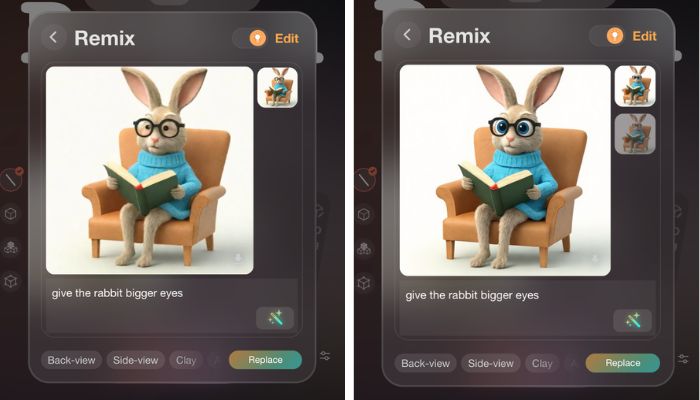
The OmniCraft suite adds a 3D mesh editor, a format converter, an SVG/vector-to-3D tool, and an HDRI generator, alongside Rodin’s built-in “redo” system for regenerating geometry or materials a set number of times per plan.
Generation speed:
Per Hyper3D’s published figures for Rodin Gen-2.5, geometry generates in about four seconds and a complete textured model in about five seconds, though actual speed varies with polycount, queue load, and plan tier.
Commercial licensing:
Free-tier output is not covered by Hyper3D’s “unlimited export and any use” terms, so free assets appear restricted. Broader export and usage rights start on the Creator plan, and Business specifically adds a commercial license for ChatAvatar-generated content. Hyper3D advises reviewing its current terms before using generated assets in regulated or high-risk contexts.
Platform integrations:
Rodin ships plugins for Blender, Unity, Unreal, Godot, Maya, 3ds Max, Cinema 4D, and Omniverse/Isaac, plus a ComfyUI integration and full REST API access on the Business and Enterprise tiers.
Tripo AI
Tripo AI is an AI 3D foundation model launched in 2024 by VAST. They offer an web app, API platform, and community resources, with clients including Tencent, NetEase Games, Sony, and Bambu Lab.
Pricing and plans:
Tripo runs on a credit-based subscription with four tiers: Free, Pro, Max, and Team. The Free plan includes 200 credits a month (up to eight models), one concurrent task, and no commercial rights. Pro costs $19.90/month ($13.93/month billed annually) for 3,000 credits, around 120 models, and unlocks private models and commercial use. Max ($89.90/month, or $53.94 billed annually) scales to 25,000 credits and 100 concurrent tasks for heavier workloads. Team ($109.90/month per seat) adds shared workspaces and centralized billing for studios. Annual billing cuts cost by up to 50% across all paid tiers.
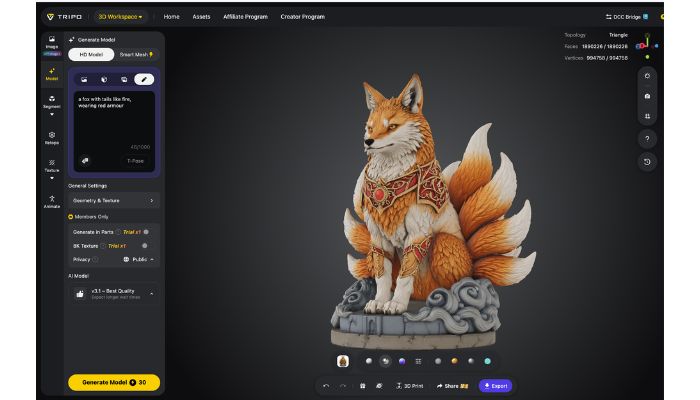
Credit: Tripo
Model and mesh quality / print-readiness:
Tripo exports directly to STL, OBJ, FBX, GLB, USD, and 3MF, so files can go straight into a slicer without a conversion step. Paid tiers add an “Ultra-high mesh quality” mode alongside Smart Mesh, which targets cleaner, lower-poly topology when print-readiness matters more than surface detail.
Texture and material quality:
The platform generates 4K, PBR-ready texture sets in one click and includes a Magic Brush tool for locally repainting or correcting specific areas of a texture without regenerating the whole model.
Editing and customization tools:
Tripo includes model segmentation (splitting a mesh into separate, editable parts), retopology, and automatic rigging and animation with preset motion libraries, all inside the same workspace.
Generation speed:
Generation time varies with mode and queue priority, ranging from a few seconds for lower-poly Smart Mesh output to a few minutes for high-detail models. Paid tiers get priority queueing, and Max and Team add dedicated processing to skip peak-hour slowdowns.
Commercial licensing:
Models generated on the Free plan cannot be used commercially. Commercial rights are unlocked starting on the Pro tier.
Platform integrations:
Tripo offers an official Blender plugin for in-editor generation and a developer API for teams scripting generation and post-processing into a production pipeline.
Have you used a 3D model generator before? Let us know in a comment below or on our LinkedIn and Facebook pages! Don’t forget to sign up for our free weekly Newsletter here for the latest 3D printing news straight to your inbox! You can also find all our videos on our YouTube channel.




Straight to STL is pretty damn useful. @the pizza edition
The Kobelco SK350-8 turbocharger information is useful for anyone checking J08E engine compatibility and identifying the correct 24100-4640 part. For readers interested in gaming as a separate form of entertainment, 3 Patti Elite offers an online card-gaming experience, and the Official 3 Patti Elite APK can be explored by players looking for more information.
AI 3D model generators are making 3D printing more accessible by helping users turn ideas into printable designs faster. For readers who also enjoy online gaming, 3 Patti Elite offers a card-gaming experience with engaging gameplay, and the Official 3 Patti Elite APK can be explored by interested players.